Liner nøtes/Mobile
Logging and Beyond: A Practical Approach to Firebase Crashlytics and Timber in Android App Development
featuredFirebase Crashlytics is a real-time crash reporting tool by Google that is also integrated with Google Analytics. This tool helps you track and fix stability issues. When added to your Android project, it maps information for the app’s build by default. Developers can also log custom events and keys, providing additional context about the crash. To complement this additional context we introduce a logging library called Timber.

Firebase Crashlytics is a real-time crash reporting tool by Google that is also integrated with Google Analytics. This tool helps you track and fix stability issues. When added to your Android project, it maps information for the app’s build by default. Developers can also log custom events and keys, providing additional context about the crash. To complement this additional context we introduce a logging library called Timber.
Timber offers a robust solution for tracking, analyzing and resolving app crashes. Let’s create a simple app that utilizes these tools.
Create a new project or in an existing project incorporate the necessary dependencies. You can seamlessly add these dependencies through the Firebase Assistant plugin by navigating to the Tools menu.
Alternatively, if you prefer to add them manually, insert the following dependencies in the build.gradle.kts file at the app level:
id("com.google.gms.google-services") version "4.3.15" apply false
id("com.google.firebase.firebase-perf") version "1.4.2" apply false
id("com.google.firebase.crashlytics") version "2.9.6" apply false
Also add dependencies in project level.
implementation(platform("com.google.firebase:firebase-bom:32.2.3"))
implementation("com.google.firebase:firebase-crashlytics-ktx")
implementation("com.google.firebase:firebase-analytics-ktx")
implementation("com.jakewharton.timber:timber:5.0.1")
Don’t forget to add the plugins in your project level.
id("com.google.gms.google-services")
id("com.google.firebase.crashlytics")
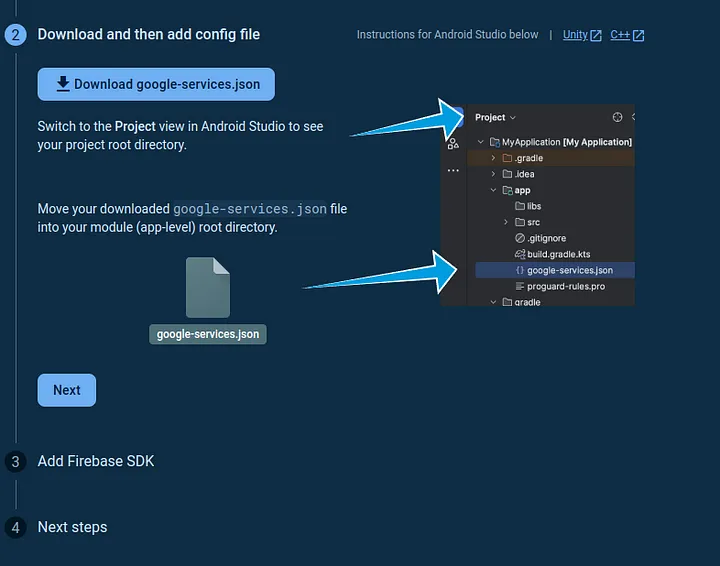
One last thing, you are required to create a project in firebase console. Follow the instructions when you reach at this step you will only download the google-services.json file and add it to your project folder as shown in the image.
Now you are ready to sync your project.
To start off, we will create a custom class called CrashlyticsTree that will implement Tree class which is a logging destination where log messages can be directed.
We will override the log method and implement our firebase crashlytics custom events.
class CrashlyticsTree: Timber.Tree() {

    private val crashlytics = FirebaseCrashlytics.getInstance()

    override fun log(priority: Int, tag: String?, message: String, t: Throwable?) {

        if (priority == Log.VERBOSE || priority == Log.DEBUG || priority == Log.INFO) {
            return
        }

        if (BuildConfig.DEBUG) {
            crashlytics.setCrashlyticsCollectionEnabled(false)
            return
        }

        crashlytics.setCustomKey(CRASHLYTICS_KEY_PRIORITY, priority)

        if (tag != null) {
            crashlytics.setCustomKey(CRASHLYTICS_KEY_TAG, tag)
        }
        crashlytics.setCustomKey(CRASHLYTICS_KEY_MESSAGE, message)

        if (t == null) {
            crashlytics.recordException(Exception(message))
        }
        else {
            crashlytics.recordException(t)
        }
    }

    companion object {
        private const val CRASHLYTICS_KEY_PRIORITY = "priority"
        private const val CRASHLYTICS_KEY_TAG = "tag"
        private const val CRASHLYTICS_KEY_MESSAGE = "message"
    }
}
We will go though each block we have in the class:
private val crashlytics = FirebaseCrashlytics.getInstance()
This line initializes Firebase crashlytics which we use to interact with crashlytics service.
if (priority == Log.VERBOSE || priority == Log.DEBUG || priority == Log.INFO) {
    return
}
In this block, it filters out log messages based on priority levels where the ones listed in the parentheses are ignored.
if (BuildConfig.DEBUG) {
       crashlytics.setCrashlyticsCollectionEnabled(true)
       return
}
In this block, if the app is in debug mode we will disable crashlytics collection. We do this to avoid reporting development crash logs.
crashlytics.setCustomKey(CRASHLYTICS_KEY_PRIORITY, priority)

if (tag != null) {
    crashlytics.setCustomKey(CRASHLYTICS_KEY_TAG, tag)
}

crashlytics.setCustomKey(CRASHLYTICS_KEY_MESSAGE, message)

if (t == null) {
     crashlytics.recordException(Exception(message))
}
else{
     crashlytics.recordException(t)
}


companion object {
    private const val CRASHLYTICS_KEY_PRIORITY = "priority"
    private const val CRASHLYTICS_KEY_TAG = "tag"
    private const val CRASHLYTICS_KEY_MESSAGE = "message"
}
In this block, we will create custom keys that will be sent to crashlytics. You are free to customize your keys depending on the requirement of the app.
We will create a class called CrashDemoApp that extends the Application class which is our entry point of our app.
class CrashDemoApp: Application() {

    override fun onCreate() {
        super.onCreate()
        initTimber()
    }

    private fun initTimber()  = when {
        BuildConfig.DEBUG -> {
            Timber.plant(object : Timber.DebugTree() {
                override fun createStackElementTag(element: StackTraceElement): String? {
                    return super.createStackElementTag(element) + ":" + element.lineNumber
                }
            })
        }
        else -> {
            Timber.plant(CrashlyticsTree())
        }
    }
}
In our private function initTimber, we configure Timber logging based on whether the app is running in debug mode or not.
BuildConfig.DEBUG -> {
      Timber.plant(object : Timber.DebugTree() {
            override fun createStackElementTag(element: StackTraceElement): String? {
                return super.createStackElementTag(element) + ":" + element.lineNumber
            }
       })
}
In debug mode, we plant a tree that overrides createStackElementTag that includes the line number of the output.
If in release mode, we plant our custom CrashlyticsTree class.
To test if it works, you can simulate an error as shown below
Button(
    onClick = {
         simulateError()
    }
) {
     Text(text = "Throw Error")
}


private fun simulateError() {
    try {
        // Some code that may throw an exception
        throw RuntimeException("Simulated error for demonstration purposes.")
    } catch (e: Exception) {
        // Log the error using Timber
        Timber.e(e, "An error occurred in the MainActivity")
    }
}
Refer to Github.